
Preview in:
As you may already know, reverse image search tools are designed to search using images rather than text. This makes it much easier to find the most relevant results. In addition to basic image search functions, these tools allow you to locate the source(s) of an image.
How can it be helpful?
- Verifying authenticity: check where the image was originally published and confirm whether it has been edited or taken out of context.
- Check for misinformation: check whether an image has been reused or altered for spreading false information.
- Tracking copyright violations: artists, photographers, and content creators can find sources where their images are used without permission.
- Finding higher-resolution images: designers or marketers can locate high-quality versions of images by searching for the same visual in larger formats.
- Product sourcing and shopping: consumers can use reverse image search to find products from images, find where they are sold, and compare prices.
- Checking for manipulated or filtered images: uncover whether an image has been digitally edited or passed through filters to alter its appearance.
- Academic research and sourcing: use image searches to find the original source of images that are necessary for references for their work.
How to find the source of an image with lenso.ai?
Lenso.ai is a perfect example of a reverse image searchtool where you can not only search by image but also find the original source or discover where the image has been published.
Based on that, all you need to do is upload an image and start your image search. You can then explore results in following categories:
- People
- Places
- Duplicates
- Similar images
- Related images
Finding duplicated and copied images online with lenso.ai
If you want to find where the image was originally published, simply select the image and click on the 'web icon' located beneath it.
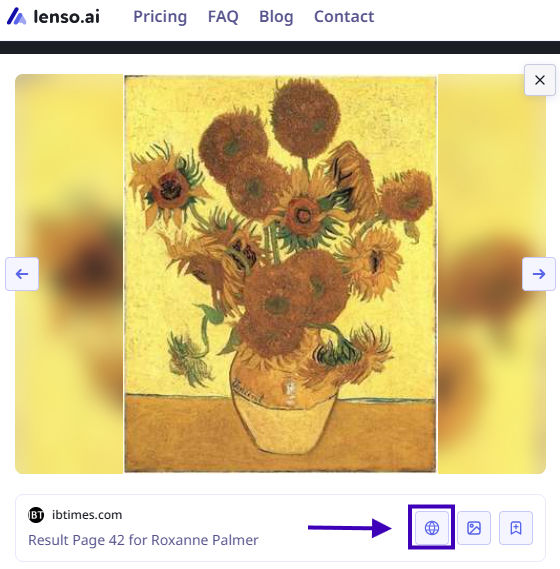
Explore additional options on lenso.ai
There is more to that! With filter and sorting options available on lenso.ai you can perform an in-depth search and find the best possible match or reassure whether your image has been duplicated, edited, filtered or somehow misused.
Filter options:
- Text - search by keywords; upload a blue mug and try the keyword “red” to find red mugs
- URL - search only on a specific website by providing its URL
Sorting options:
- Newest/Oldest - sort pictures based on the date of indexing
- Best/Worst match - sort based on how well the image matches the pictures in the index
- Random - sort randomly for more diverse results
- Show diverse results - find the same people or places in different arrangements.
Want your image removed from lenso’s index?
If you find an image that is protected by copyright law or you don't want lenso to index your face, please fill out the DSA formor submit an Opt-Out requestaccordingly.
DMCA/DSA or Opt-Out — Which Form to Choose and How to Fill Out the Request?

Author
Julia Mykhailiuk
Marketing Specialist
Continue reading

Guides
Image search for investigations: How to find more information from a photo?
Sometimes, an image is all we have: no additional information or background history, just a photo or recording. Is that enough to start an investigation? It may not be ideal, but it is enough to perform an image search, which can uncover valuable information and support the investigation. So, how can you find more information from a photo?

Guides
Copyright protection for YouTubers: how to find stolen thumbnails and profile photos?
YouTube creators sometimes spend hours working on a new video, and the worst thing that can happen is that someone simply steals it, reuses it inappropriately, and the creator receives no credit for it. How can you find stolen content and protect your copyright as part of the YouTube community?

Guides
How to Delete Your Face from the Internet? Top DMCA and Opt-out Methods
Are there images of your face on the internet that you’d like to take down? Read this tutorial to learn the best methods of finding and deleting your photos online!
.png?tr=w-768,h-auto)
Guides
How can reverse image search be useful on vacation?
There is no need to convince anyone that the Internet is extremely helpful when traveling - we use it not only to check maps, book accommodation, order taxis, or stay in touch with loved ones, but also to search for information about the places we visit. However, not everyone knows that so-called reverse image search can also help with discovering new places, although it also requires an Internet connection to work.

Guides
5 Best Tenant Screening Platforms for Landlords
Students, foreigners, travelers, or anyone moving to a new town are all potential tenants. There's nothing wrong with wanting to do an extra background check or simply verify who will be living in your property. How can you do it? Easily, with tenant screening platforms.